Blog
What Is OCuLink: A Beginner’s Guide
Most of us understand USB as a connection, but recently, OCulink came into the limelight. Its excellent data transfer capability shines in applications that require high performance, such as gaming. So, it is gradually winning over some people with its good performance and cost-effectiveness. This guide will take you through OCulink as a connectivity method and compare it with connectivity standards such as USB, Thunderbolt, etc.
Table of contents
What is OCuLink?
OCuLink stands for Optical Copper (Cu = chemical symbol for copper) Link and is an externalized connection technology that allows you to connect PCIe devices using external cables. The interface was developed by the PCI-SIG (Peripheral Component Interconnect Special Interest Group). OCuLink 2.0 has a bandwidth of up to 64 GB/s.
What is OCuLink Cable?
The OCuLink cable is an OCuLink-compliant cable designed to provide a smaller, more flexible connectivity solution. It is terminated with an OCuLink connector and complies with various standards, including SAS and PCIe.
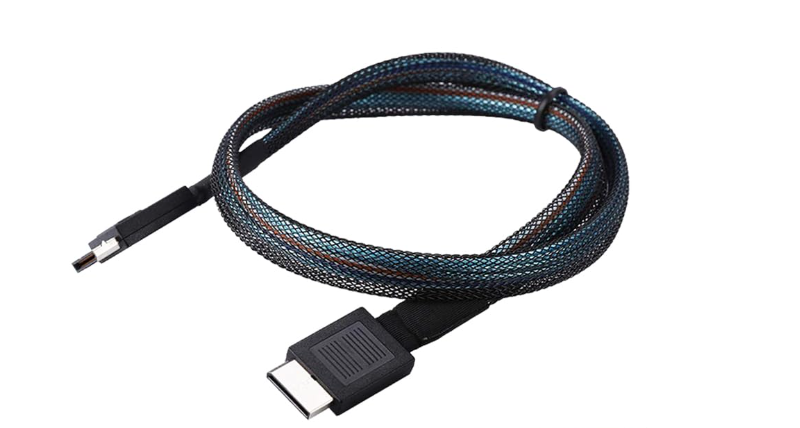
OCuLink cable can provide up to 64Gbps bandwidth, making it especially suitable for data centers, high-performance presses, and other high-speed data transmission application scenarios. It has a wide range of product specifications, with multi-channel options, of which 4X is the most commonly used type. In addition, the design is flexible; straight or side exits can be customized according to the user’s needs.
What is OCuLink Port?
OCuLink ports comply with the OCuLink connectivity standard and are mainly used for external graphics cards, server motherboards, storage devices, etc. Users can connect their PCIe pens to the host computer via external cables without taking up the internal card slots through these ports. The OCuLink port supports different protocols, such as PCIe 3.0 and PCIe 4.0, and storage protocols, such as SATA and SAS.

OCuLink vs. Thunderbolt
- Supported protocols: OCuLink 2.0 supports SAS 4.0 and PCIe 4.0. Thunderbolt 5 is based on the USB4 v2.0 protocol and supports PCIe and DisplayPort protocols.
- Bandwidth: OCuLink 2.0 has a bandwidth of up to 64 Gbps, while Thunderbolt 5 has a bandwidth cap of 120 Gbps.
- Cost: OCuLink includes adapters and cables that cost tens of dollars, while a good Thunderbolt will cost a few hundred dollars.
- Performance: OCuLink’s high bandwidth performance is beautiful for eGPU setups and offers better frame rates and lower latency than the much weaker Thunderbolt.
- Setup: Thunderbolt is relatively easy to set up and is friendlier to the less technically savvy.
- Universality: Thunderbolt still offers the advantages of widespread adoption, plug-and-play convenience, and a broader ecosystem of compatible devices. But OCuLink is coming on strong, breaking out of the server room and into the consumer space.

OCuLink vs. USB4
- Conceptual Comparison: OCuLink is a connectivity standard developed by the PCI-SIG (PCI Special Interest Group) for high-bandwidth internal and external device connectivity. USB is an industry standard that allows power and data exchange between viable devices.
- Data Transfer Rate: USB4 supports 2080Gbps, while PCIe4.0’s maximum bandwidth of OCuLink is 64Gbps.
- Supported protocols: OCuLink 2.0 supports SAS 4.0 and PCIe 4.0. USB4 is based on the Thunderbolt 3 protocol and supports PCIe and DisplayPort protocols.
- Performance: OCuLink is designed for external graphics cards, so it performs better in games than USB4.
- Cost: OCuLink is cheaper to design, while USB4 is more costly due to its more features.
- Usage: OCuLink is mainly used for high-performance hardware connections. In contrast, USB4 is more versatile and can connect various devices, including printers, monitors, etc.
Overall, OCuLink 2.0 has a clear advantage in terms of bandwidth and stability. It is especially suitable for applications that require high bandwidth and low latency, such as external graphics card docking stations or cloud gaming. USB 4, on the other hand, performs better in terms of versatility and compatibility and is suitable for a wider range of application scenarios.

Thunderbolt 5 vs Thunderbolt 4 vs USB4 vs USB3.2
| Item | Thunderbolt 5 | Thunderbolt 4 | USB4 | USB3.2 |
| Data transfer rate | 120 Gbps | 40 Gbps | A minimum of 20 Gbps and 40 Gbps are optional. 120 Gbps is optional with USB4 Version 2.0 | 5 Gbps (Gen 1), 10 Gbps (Gen 2), or 20 Gbps (Gen 2×2) |
| PC video requirements | Dual 6K or Dual 8K | Dual 4K or Single 8K | One monitor | One monitor |
| PC data requirements | Pcle:64 Gbps USB3:10 Gbps | PCIe: 32Gbps USB 3: 10Gbps | USB 3: 10Gbps | USB 3: 5Gbps |
| Required PC charging on at least one computer port | Required up to140W available up to 240W | Required up to 100W available up to 140W | Available up to 240 W | Available up to 240 W |
| Minimum PC port power for accessories | 15W | 15W | 7.5 W | 4.5 W |
| compatibility | Compatible with previous generations of Thunderbolt | Thunderbolt 4 backward compatible Thunderbolt 3, compatible with USB 4.0, and previous generations of USB | Compatible with previous generations of USB, compatible with Thunderbolt 5, Thunderbolt4, Thunderbolt3 | Compatible with previous generations of USB |
FAQ
Q. What versions of OCuLink are available?
A. OCuLink is currently available in two versions. Below is a detailed description of these two versions:
- OCuLink 1.0: This is the initial version, which was proposed in 2013. It supports the PCIe 3.0 protocol and provides a 4-lane PCIe Gen 3 configuration with a bandwidth of 8GT/s per lane and up to 32Gbps.
- OCuLink 2.0: This upgraded version supports the PCIe 4.0 protocol and provides a higher data transfer rate. It also offers a 4-lane PCIe Gen 4 configuration, with the bandwidth of each lane boosted to 16GT/s for a total bandwidth of up to 64Gbps.
Q. Can Thunderbolt 5 devices be used with Thunderbolt 4 ports?
A. Yes, Thunderbolt 5 devices are backward compatible with Thunderbolt 4 ports. However, this is not recommended because Thunderbolt 5 devices can only run at the maximum rate of Thunderbolt 4 (40Gbps), which does not allow the full potential of Thunderbolt 5 to be realized. Not only does this waste the cost of purchasing the latest device, but it also doesn’t help your gaming experience or productivity gains.
Q. Which one should I choose, Thunderbolt 4 or USB4 cable?
A. If you need to connect multiple monitors and don’t require much cable versatility, go for the Thunderbolt 4. However, when you want better cable compatibility and functionality and have a smaller budget, the USB4 cable is a better choice. If you want to focus on other aspects of the two, you can check out the comparison table above and choose the cable that best suits your needs.
Conclusion
This article introduces the OCuLink interface standard and related interface standards. You can learn about their differences. Regarding trends, adopting OCuLink in the consumer sector seems inevitable, even though it appeared later. More importantly, it offers significant advantages for external graphics cards, making it an attractive alternative to eGPU solutions. Therefore, more and more eGPU products are expected to support both OCuLink and Thunderbolt ports.
Reference
- https://www.anker.com/au/blogs/hubs-and-docks/everything-you-need-to-know-about-thunderbolt-4

bandwith is wrong on usb4: “USB4 supports 2080Gbps” should be 40Gbps
I love how casually you mix up GB/s with Gb/s… Is this AI generated? No human red this before posting? Actually there much more silly errors, but it seems nobody cares to fix’em
AI’s read of your article:
This article is technically incorrect in multiple places.
Not “arguably misleading” — objectively wrong.
1. ❌ “USB4 supports 2080 Gbps” — false
USB4 does not and never has supported 2080 Gbps.
Verified USB4 bandwidths (per USB-IF specs):
USB4 v1: 20 Gbps / 40 Gbps
USB4 v2: 80 Gbps symmetric or 120 Gbps asymmetric
Thunderbolt 4 (which USB4 builds upon): 40 Gbps max
There is no USB standard at 2080 Gbps.
That number is fabricated or badly misunderstood marketing math.
This single sentence alone invalidates the article’s credibility.
2. ❌ “PCIe 4.0 OCuLink max is 64 Gbps” — misleading framing
PCI Express 4.0 via OCuLink commonly exposes PCIe Gen4 x4, which is:
64 GT/s raw
~63–64 Gbps usable after encoding
That part is numerically correct — but the comparison is dishonest because:
USB4 bandwidth includes protocol tunneling + arbitration
OCuLink bandwidth is raw PCIe, no tunneling
They are not comparable transports.
3. ❌ “USB4 supports PCIe and DisplayPort” — true but abused
USB4 tunnels:
PCIe
DisplayPort
USB
That means:
Bandwidth is shared
Latency is higher
Sustained PCIe throughput is lower than link speed
OCuLink:
Is PCIe
No encapsulation
No display traffic
No USB traffic
The article implies protocol support equals performance.
That is fundamentally wrong.
4. ❌ “OCuLink performs better in games” — oversimplified but directionally correct
The reason is not explained properly.
OCuLink often outperforms USB4/TB because:
Lower latency
No PCIe tunneling
No USB controller involvement
Deterministic link behavior
The article states the conclusion without understanding the cause.
5. ❌ “USB4 is more costly due to more features” — incomplete
USB4 requires:
Active retimers
Certified controllers
Firmware stacks
Compliance testing
Power delivery logic
OCuLink:
Passive copper cable
PCIe root port exposure
Minimal validation
This is correct in outcome, but again poorly reasoned.
6. The real error pattern
This article:
Confuses raw signaling math with usable bandwidth
Treats USB4 ≠ PCIe, yet compares them numerically
Repeats a non-existent 2080 Gbps figure
Appears to be written by marketing, not an engineer
This is not a typo — it’s a systemic misunderstanding.
Bottom line (plain language)
Yes — the article is wrong.
USB4 does not do 2080 Gbps.
OCuLink is chosen not because it “looks slower,” but because it behaves like a direct motherboard slot.